Hardware IPTV Encoder: Complete Guide to Features, Uses, and Setup
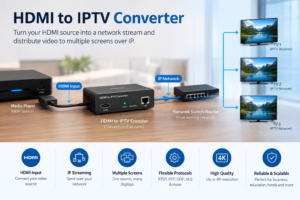
A hardware IPTV encoder is a dedicated electronic device that converts video and audio signals into a digital format suitable for streaming over an IP network. It helps broadcasters, businesses, hotels, and content providers distribute live television, events, and other video content to compatible screens and streaming platforms.
Unlike software-based encoding, a hardware IPTV encoder uses specialized processing components to handle video conversion efficiently. Depending on the model, it may support HDMI, SDI, or other video inputs, along with encoding standards such as H.264 and H.265.
Whether you are building a professional IPTV system or exploring live streaming for the first time, understanding how these devices work can help you select suitable equipment, improve stream quality, and manage bandwidth more effectively.
What Is a Hardware IPTV Encoder?
A hardware IPTV encoder is a physical device designed to receive an audio or video signal, compress it into a digital stream, and prepare it for transmission over an IP network. It is commonly used in professional broadcasting, corporate communications, education, hospitality, and live event production.
For example, a conference venue may connect a camera or video source to an encoder and distribute the resulting stream to authorized displays throughout the building.
The encoder performs several important tasks:
- Signal input: Receives video and audio from a compatible source.
- Video encoding: Compresses the signal into a digital format.
- Audio processing: Encodes supported audio signals.
- Stream packaging: Organizes encoded media into a supported transport or streaming format.
- Network delivery: Sends the stream to a compatible receiver, media server, or distribution platform.
Not every encoder performs all these functions independently. Some devices provide only encoding, while others also offer multiplexing, network streaming, or integrated decoding capabilities.
How Does a Hardware IPTV Encoder Work?
Understanding the encoding process makes it easier to plan an IPTV installation and identify equipment requirements.
1. Receiving the Video Signal
The process begins when a source supplies a video signal to the encoder. Common sources include:
- Cameras used for live events.
- Computers and presentation systems.
- Satellite or cable receiver outputs.
- Digital signage players.
- Professional video production equipment.
The source must provide an output that the encoder can accept. For example, an encoder with HDMI input cannot directly accept an SDI-only source without compatible conversion equipment.
2. Compressing the Video
Raw or uncompressed video requires considerable bandwidth. The encoder uses a video codec to reduce the amount of data needed for transmission.
- H.264/AVC: Widely supported by streaming equipment, media servers, and playback devices.
- H.265/HEVC: Can deliver comparable visual quality at lower bitrates in suitable conditions, but requires compatible hardware and software.
The best codec depends on the capabilities of the receiving devices, network capacity, video resolution, and quality requirements.
3. Preparing the Stream
After encoding, the device packages the audio and video into a supported format. Depending on the equipment, this may involve MPEG transport streams or protocols and formats used for IP video delivery.
Common options include:
- MPEG-TS over UDP or RTP: Used in many professional IPTV and broadcast networks.
- RTMP: Used in compatible contribution and streaming workflows.
- SRT: Supports contribution workflows where network conditions may be challenging.
- HLS: Supports HTTP-based delivery through compatible servers and platforms.
These options are not interchangeable in every situation. Check whether the encoder, media server, and receiving devices support the same delivery workflow.
4. Sending the Stream Across the Network
The encoded stream travels through an Ethernet connection or another supported network interface. It may be delivered to a local IPTV network, a media server, or an authorized online streaming platform.
For a private building-wide IPTV deployment, multicast may help distribute a stream efficiently to multiple compatible receivers. For internet delivery, unicast and HTTP-based streaming are common approaches.
5. Decoding and Displaying the Video
At the receiving end, a compatible television, set-top box, computer, or playback application decodes the stream and displays the content.
The encoder is only one part of the complete system. Network configuration, receiver compatibility, and server capacity also influence the final viewing experience.
Hardware IPTV Encoder vs. Software Encoder
Both hardware and software encoders convert video into digital formats, but they differ in implementation, flexibility, and operating requirements.
| Feature | Hardware Encoder | Software Encoder |
|---|---|---|
| Processing | Dedicated encoding hardware | CPU, GPU, or supported acceleration |
| Setup | Often purpose-built for a specific workflow | Requires a compatible computer or server |
| Portability | Frequently compact and purpose-built | Depends on the computer or server |
| Flexibility | Depends on the device’s features | Often highly configurable |
| Maintenance | Firmware and hardware maintenance | Operating system and application maintenance |
| Best suited for | Dedicated, repeatable encoding tasks | Flexible production and software-based workflows |
When Should You Choose Hardware Encoding?
A dedicated hardware IPTV encoder can be useful when you need a stable, repeatable setup for continuous streaming, professional video inputs, or integration with existing broadcast equipment.
It can also reduce the need to dedicate a general-purpose computer to a single encoding task.
However, hardware is not automatically better in every scenario. A software encoder may be more appropriate when you need advanced scene composition, frequent configuration changes, multiple production tools, or a low-cost test environment.
The right choice depends on your operational requirements rather than the type of encoder alone.
Related article: Hardware IPTV Encoder vs. Software IPTV Encoder
Key Features to Look for in a Hardware IPTV Encoder
Before purchasing equipment, compare the technical specifications against your actual streaming requirements.
1. Video Input Compatibility
Input compatibility should be one of your first checks. Common interfaces include:
- HDMI: For computers, consumer electronics, and many cameras.
- SDI: For compatible professional video production equipment.
- Composite video: Available on certain legacy systems.
- IP-based inputs: Available on devices designed to receive network streams.
Some encoders support several inputs, while others are designed for one source. If you plan to connect multiple cameras or channels, confirm whether the device supports simultaneous inputs or requires a separate encoder for each source.
2. Supported Resolutions and Frame Rates
Different installations have different video requirements. A basic internal information channel may work well at 720p, while a sports venue or production studio may require 1080p or 4K.
Check the following specifications:
- Maximum input resolution.
- Maximum encoding resolution.
- Supported frame rates.
- Progressive or interlaced input support.
- Whether the advertised resolution applies to every input and codec.
Remember that an encoder accepting a 4K input does not necessarily mean it can encode and stream 4K video. Verify the actual encoding capabilities.
3. Supported Video Codecs
The codec determines how video is compressed and affects compatibility, bandwidth requirements, and processing performance.
H.264 is a practical choice for broad compatibility. H.265 may be useful when bandwidth efficiency is important and the entire playback chain supports it.
For professional applications, check whether the encoder offers configurable bitrate, keyframe intervals, and other encoding parameters required by your distribution system.
4. Audio Encoding Support
Audio compatibility is just as important as video compatibility. Depending on the device, supported audio formats may include AAC, MPEG audio, or other formats used in professional systems.
Verify the number of audio inputs, embedded audio support, channel configuration, and compatibility with the receiving platform. If the content includes multiple languages or audio tracks, confirm that the equipment can handle your intended workflow.
5. Network Interfaces and Protocols
An encoder may offer one or more Ethernet ports and support several streaming protocols. Look for specifications covering:
- Ethernet speed.
- Supported streaming protocols.
- Unicast and multicast capabilities.
- Network configuration options.
- VLAN compatibility where required.
- Authentication and access-control features.
A gigabit Ethernet port may be useful in a multi-channel installation, but the total network design still needs sufficient capacity for all streams and other traffic.
6. Reliability and Remote Management
Professional IPTV systems may need to operate for extended periods with limited intervention. Useful features can include:
- Web-based configuration.
- Monitoring of stream status.
- Firmware updates.
- Device logs and diagnostics.
- Alerts for signal or network problems.
- Redundant power options on selected models.
Check the manufacturer’s documentation for the device’s intended operating conditions and support arrangements.
Types of Hardware IPTV Encoders
Not every encoding device is designed for the same job. Understanding the main categories helps narrow your search.
HDMI IPTV Encoders
An HDMI encoder accepts a compatible HDMI source and converts it into an IP video stream. Typical applications include meeting rooms, classrooms, digital signage, live presentations, and certain hospitality installations.
When comparing HDMI models, verify input resolution, audio support, output protocols, and any limitations related to protected content. HDMI compatibility does not guarantee that every source can be captured or streamed.
SDI IPTV Encoders
SDI encoders are designed for compatible professional video workflows. SDI is commonly used in studios, broadcast facilities, and live event production.
Depending on the model, these devices may support professional signal formats and longer cable runs than typical HDMI installations.
Confirm the exact SDI standard and signal format supported by the device before integrating it into a production system.
Multi-Channel IPTV Encoders
Multi-channel encoders process several independent video sources in one device or chassis. They may be useful for hotels, campuses, hospitals, corporate networks, and broadcasting facilities that distribute multiple channels.
Before choosing one, examine the maximum number of simultaneous channels, resolution limits per channel, total bitrate, and whether all inputs can use the same encoding settings.
Professional Broadcast Encoders
Professional broadcast encoders are designed for more demanding video contribution and distribution environments.
Depending on the product, they may include advanced monitoring, professional interfaces, multiple output formats, and redundant network or power options.
These systems are generally selected according to specific operational requirements rather than price alone.
Hardware IPTV Encoder Applications
Hardware encoders support a wide range of legitimate video distribution use cases.
Hotels and Hospitality
Hotels may distribute authorized television channels, internal information, promotional content, and event programming to compatible in-room televisions.
The equipment must integrate with the property’s network, middleware, and television systems. A well-planned installation should also account for channel authorization, network segmentation, and support requirements.
Corporate Offices
Businesses can use encoders to distribute presentations, company announcements, training sessions, and internal live events.
A dedicated encoder may simplify the process of connecting an existing audiovisual system to an IP distribution network. For larger organizations, access permissions and network security should be considered during the design stage.
Education and Training
Schools and training centers may use IPTV encoding to distribute lessons, campus announcements, and live presentations to authorized classrooms.
Compatibility with classroom displays and the institution’s existing network is essential.
Sports and Live Events
Venues can encode video feeds from cameras and distribute them to screens in lounges, waiting areas, press rooms, or other designated locations.
For live sports, frame rate, motion handling, bitrate stability, and end-to-end latency deserve particular attention.
Broadcasting and Media Production
Broadcasters and production teams may use encoders to send live video to a media server, contribution network, or distribution platform.
The required features depend on whether the workflow is intended for local distribution, remote contribution, or delivery to an online audience.
How to Choose the Right Hardware IPTV Encoder
The best device is the one that meets your technical requirements without introducing unnecessary cost or complexity. Use the following steps to evaluate your options.
Step 1: Define Your Use Case
Start by describing what you want to stream. Are you distributing one HDMI source to several screens, encoding multiple professional camera feeds, or sending an authorized television channel into a private network?
A clear use case makes it easier to eliminate unsuitable devices.
Step 2: Identify Your Video Sources
List every source and its output interface. For each source, record:
- Interface type.
- Resolution and frame rate.
- Audio requirements.
- Number of simultaneous sources.
- Any special signal or content-protection constraints.
This information helps you determine the necessary encoder inputs.
Step 3: Estimate Bandwidth Requirements
Each stream consumes network bandwidth according to its bitrate.
For example, a stream configured at 6 Mbps sends approximately 6 megabits of video and audio data per second before accounting for protocol overhead and other network traffic.
If you distribute several streams, calculate the combined bitrate and leave sufficient headroom for overhead, other traffic, and changes in operating conditions.
For multicast deployments, network switches and receivers must be configured appropriately. Multicast does not eliminate the need for a properly engineered network.
Step 4: Check Receiver Compatibility
Confirm that the destination devices can decode the chosen codec, resolution, audio format, and delivery protocol.
A technically capable encoder may still be unsuitable if your set-top boxes or playback applications cannot receive its output.
Step 5: Compare Management and Support Features
Consider how the device will be monitored and maintained after installation.
For systems that run continuously, accessible diagnostics, reliable firmware support, and clear technical documentation may be more valuable than an extra feature you will rarely use.
Step 6: Test Before Full Deployment
If possible, test the encoder with your actual sources, network equipment, and playback devices.
Evaluate picture quality, audio synchronization, startup time, latency, stream stability, and recovery after a network interruption.
A small pilot installation can reveal compatibility problems before you invest in a larger deployment.
Hardware IPTV Encoder Setup: A Practical Guide
The exact installation process depends on the equipment, but a typical workflow includes the following steps.
1. Connect the Video and Audio Source
Use the correct cable and interface for your source and encoder. Check that the source is producing a supported signal and that the encoder detects it correctly.
2. Connect the Encoder to the Network
Attach the Ethernet cable to the appropriate network port. Configure the IP address and other network settings according to the manufacturer’s instructions and your network administrator’s requirements.
3. Open the Configuration Interface
Many devices offer a browser-based management interface. Follow the manufacturer’s instructions to access it and change the initial settings.
Use unique credentials and avoid exposing the management interface directly to the public internet.
4. Configure Encoding Parameters
Select the appropriate settings, which may include:
- Video codec.
- Resolution and frame rate.
- Video bitrate.
- Audio codec and bitrate.
- Keyframe interval.
- Streaming protocol.
- Destination address or server.
The exact available options vary by model.
5. Configure the Receiving System
Set up the compatible media server, IPTV middleware, set-top box, or playback application to receive the stream.
For multicast delivery, coordinate the multicast address and network configuration with the administrator responsible for the network.
6. Test Playback and Monitor Performance
Play the stream on the intended receiver and check for visual artifacts, missing audio, excessive latency, or interruptions.
Monitor the encoder and network during a longer test to identify issues that may not appear during a short demonstration.
Related article: Step-by-Step IPTV Network Setup Guide
Common Hardware IPTV Encoder Problems and Solutions
Even a correctly installed encoder can experience problems when the source, network, or receiver is misconfigured.
No Video Signal
Possible causes: Incorrect input selection, unsupported resolution or frame rate, loose or damaged cables, incompatible signal format, or a source device that is not outputting video.
What to do: Check the source output, confirm the selected input, and test a known-compatible signal and cable.
Poor Picture Quality
Blurry images, blocking artifacts, or excessive compression may result from unsuitable encoding settings or insufficient available bandwidth.
What to do: Review the bitrate, codec, resolution, frame rate, and source quality. Increase bitrate only when the encoder, network, and receiving system can support it.
Buffering or Interrupted Playback
Playback interruptions may be caused by network congestion, packet loss, unstable source signals, or problems with the receiving server.
What to do: Monitor network performance, check the encoder’s stream statistics, and verify the receiver’s configuration. Test the stream on a controlled local network to help isolate the cause.
Audio and Video Out of Sync
Synchronization problems may originate at the source, during encoding, or in the receiving system.
What to do: Check audio input settings, embedded audio configuration, and receiver compatibility. Consult the manufacturer’s documentation for synchronization controls if the problem persists.
High Streaming Latency
Some encoding and delivery workflows introduce more delay than others.
What to do: Review buffering settings, GOP configuration, transport protocol, server behavior, and receiver playback settings. Measure end-to-end latency rather than relying on encoder specifications alone.
Hardware IPTV Encoder Cost: What Affects the Price?
The cost of an encoder varies substantially according to its capabilities and intended application. A basic single-input device is not directly comparable to a professional multi-channel broadcast system.
Important pricing factors include:
- Number and type of video inputs.
- Maximum encoding resolution and frame rate.
- Supported codecs and streaming protocols.
- Number of simultaneous channels.
- Network interfaces.
- Monitoring and management features.
- Redundancy and reliability options.
- Warranty and technical support.
When comparing prices, check the full specification sheet and the seller’s warranty terms. A cheaper device may require additional converters, network equipment, or software that increases the total installation cost.
It is also useful to calculate the total cost of ownership, including installation, maintenance, replacement equipment, and ongoing support.
Rather than choosing solely by price, select a device that meets your present requirements and offers a reasonable path for future expansion.
Best Practices for Reliable IPTV Encoding
Good equipment is only one part of a dependable streaming system. These practices can help improve performance and simplify troubleshooting.
Keep Firmware Updated
Review manufacturer updates and security advisories. Apply updates using the recommended procedure and test the system afterward.
Secure Device Management
Change default passwords, restrict administrative access, and place management interfaces on appropriately protected networks.
Disable unnecessary services and avoid exposing control interfaces to untrusted networks.
Monitor Bandwidth and Stream Health
Track bitrate, packet loss, stream interruptions, and other available performance indicators.
Monitoring makes it easier to identify developing problems before they affect viewers.
Maintain Documentation
Record device models, firmware versions, IP addresses, input assignments, encoding profiles, and network dependencies in a secure internal document.
This information can save time during maintenance or equipment replacement.
Respect Content Rights
Only encode and distribute content that you are authorized to use. For commercial television channels, verify the applicable distribution rights, licenses, and contractual restrictions.
Hardware IPTV Encoder vs. IPTV Set-Top Box
An encoder and a set-top box usually perform different roles.
A hardware IPTV encoder converts an incoming video source into an IP stream. An IPTV set-top box generally receives an IP stream, decodes it, and presents the content on a television.
Some specialized products combine multiple functions, but you should not assume that a device can encode and decode video merely because it is marketed for IPTV.
Before buying equipment, identify whether you need to create a stream, receive a stream, or perform both functions.
Related article: IPTV Encoder vs. IPTV Decoder vs. IPTV Set-Top Box
Frequently Asked Questions About Hardware IPTV Encoders
What is a hardware IPTV encoder used for?
A hardware IPTV encoder converts video and audio signals into digital streams that can be distributed over compatible IP networks. Common uses include hospitality television systems, corporate communications, education, broadcasting, and live events.
Is a hardware IPTV encoder better than a software encoder?
Not necessarily. Hardware encoders can be convenient for dedicated, continuous encoding tasks, while software encoders offer flexibility and integration with computer-based production tools. The best choice depends on the workload, budget, compatibility requirements, and maintenance needs.
Does a hardware IPTV encoder require internet access?
No. Many encoders can send streams across a private local network without an internet connection. Internet access is needed only when required by the chosen distribution workflow, remote management arrangement, or external streaming service.
Which video codec should I choose?
H.264 is widely supported and is often a practical starting point. H.265 can improve compression efficiency in compatible systems. Confirm that both the receiving hardware and the streaming platform support the selected codec.
Can one encoder stream to multiple televisions?
Yes, depending on the network design and the encoder’s capabilities. A stream can be distributed through compatible servers, unicast connections, or multicast networks. The required network configuration depends on the number of viewers and the chosen delivery method.
What is the difference between an HDMI encoder and an SDI encoder?
An HDMI encoder accepts a compatible HDMI video source, while an SDI encoder accepts a supported SDI signal. The appropriate choice depends on the output interface of your equipment and the technical requirements of your installation.
How do I know how much bandwidth I need?
Start with the configured bitrate of each stream, add the bitrates of simultaneous streams, and allow additional capacity for protocol overhead and other network traffic. Test the complete system under realistic conditions before deployment.
Can a hardware IPTV encoder improve picture quality?
An encoder can preserve quality effectively when configured correctly, but it cannot restore detail that is missing from the original source. Picture quality depends on source quality, codec, bitrate, resolution, and the complete delivery chain.
Is a hardware IPTV encoder suitable for a small business?
Yes. A small business may use one to distribute presentations, announcements, training videos, or authorized live content. The device should match the required video inputs, network setup, and receiving equipment.
Final Thoughts: Choosing the Right Hardware IPTV Encoder
A hardware IPTV encoder is an important component in many professional video distribution systems. By converting compatible audio and video signals into IP streams, it helps organizations deliver content to screens, receivers, and streaming platforms across a network.
The best choice depends on input compatibility, supported codecs, resolution, bitrate, network protocols, management features, and the capabilities of your receiving devices.
Start by defining your use case, document your technical requirements, compare complete specifications, and test the equipment before deploying it at scale. Also consider network security, content authorization, maintenance, and long-term support.
Ready to build a reliable IPTV streaming setup? Review your current equipment, identify the features you need, and compare compatible hardware IPTV encoders before making a purchase. If you have questions about inputs, codecs, or network configuration, leave a comment or explore our related IPTV guides to find the right solution.
Learn More About IPTV Technology
For additional technical information, consult these resources:
- RFC Editor — technical standards and documentation for internet protocols.
- International Telecommunication Union (ITU) — telecommunications and video-coding standards.
- Internet Engineering Task Force (IETF) — internet standards and technical specifications.